


If you’re responsible for your organisation’s security, you’ve probably asked yourself this question in the past year: can Microsoft Defender really protect us at an enterprise level? The push to consolidate tools and reduce costs is real. Many companies are under pressure to simplify their security stack and “use what they’ve already got.” And with Defender included in many Microsoft 365 licences, it feels like an easy win.
But here’s the catch: “free” doesn’t always mean “fit-for-purpose.” Over the last few years, Microsoft has rebuilt Defender from a basic antivirus into a legitimate enterprise platform. It now spans endpoints, identities, email, and cloud workloads. The challenge is understanding where that power stops, and the security gaps it doesn’t fill.
As an Account Executive at Babble, I’ve worked with dozens of businesses that have tried to go “all in” on Microsoft security. Some have succeeded brilliantly, while others have learned expensive lessons about where third-party tools are still needed.
This review looks at where Microsoft Defender performs, where it falls short, and how to know whether it’s enough for your organisation, or whether you need to build on top of it.
–
What this article covers:
- Is Microsoft Defender good enough for enterprise security?
- What Microsoft Defender does well
- The areas where Defender needs backup
- Defender is a foundation, not the whole answer
- The consolidation debate: efficiency vs. risk
- How Defender has evolved, and what’s still ahead
- So, is Defender enough for you?
Is Microsoft Defender good enough for enterprise security?
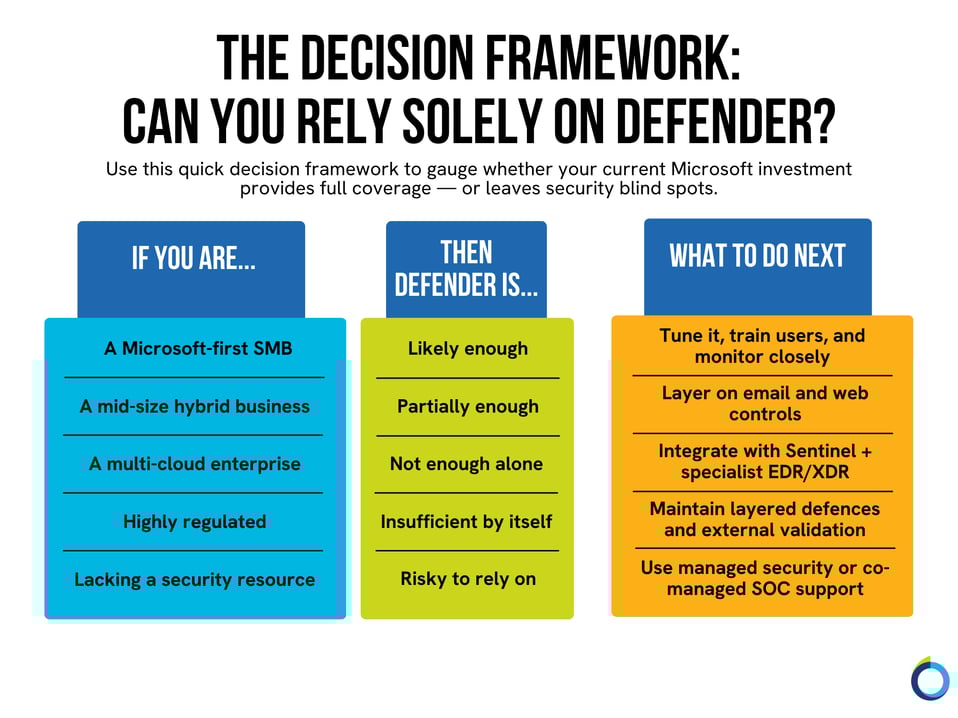
Firstly, “good enough” isn’t universal. However, the short answer is yes, but only if you’re in the right environment. If your business runs primarily on Microsoft technologies, such as Windows, Entra ID (Microsoft’s system for managing user identities and logins, formerly called Azure AD), Intune, 365, and Azure, Defender can absolutely deliver enterprise-grade protection. But if your world is more complex (hybrid clouds, mixed devices, or external integrations) it’s a different story.
Microsoft has invested heavily in making Defender smarter, faster, and more tightly integrated, but it still leans on its own ecosystem. If you’re largely operating outside the Microsoft environment, you’ll start seeing the gaps. In other words, Defender is a good product, but it becomes great only when the environment around it is right.
What Microsoft Defender does well
1. Deep integration across the Microsoft stack
This is where Defender really earns its stripes. It seamlessly ties into the wider Microsoft ecosystem: Entra ID for identity, Intune (Microsoft’s tool for managing and applying security settings to devices) for endpoint management, Sentinel for pulling security alerts from across the business into one place, and 365 for email and collaboration security.
The beauty of this is visibility. When it’s properly integrated, Defender can give you a single pane of glass to look through. You can trace an incident end-to-end: from a suspicious login, to a malicious attachment, to a compromised device all in one console.
2. Automation and response
Defender’s automated investigation and remediation (AIR), its ability to investigate an alert and take action on its own, is one of the most impressive aspects of the suite. Once tuned, it can automatically isolate devices, roll back malicious changes, and remove threats, often before a person even logs in. Businesses that properly configure automation policies have cut their incident response times in half.
3. Value and consolidation
For many, Defender’s biggest advantage is the cost efficiency. If you’re already on an E5 licence (the top tier of Microsoft 365, which bundles in Microsoft’s full security suite rather than just email and Office apps), you’re essentially sitting on a comprehensive security suite you might not even be using to its full potential.
I worked with one organisation that retired three overlapping tools by consolidating onto Defender, Intune, and Sentinel. This saved 30% in licensing costs while improving mean-time-to-respond by 40%.
4. Continuous evolution
As mentioned earlier, Microsoft is constantly expanding Defender’s capabilities. The roadmap is aggressive, and updates roll out faster than most security vendors can match. For businesses that commit to staying current, the platform keeps getting stronger.
What “good” looks like with Microsoft Defender
When Defender is deployed well, it’s impressive. But that success comes down to people, process, and discipline.
Here’s what a strong Microsoft Defender environment looks like in practice:
- Identity-first approach: Conditional Access (rules that check things like a user’s location, device and risk level before letting them log in), multi-factor authentication (MFA), and device compliance policies consistently enforced through Entra ID.
- Endpoint management: all devices enrolled in Intune with compliance baselines applied.
- Configuration hardening: policies reviewed quarterly, automation tested, false positives minimised.
- Integrated incident response: Defender alerts feeding into Sentinel with clear playbooks.
- Complementary controls: a dedicated email gateway, DNS/web filtering, and third-party MFA or Privileged Access Management (PAM) (extra controls on your highest-risk accounts, like IT admins, so one compromised login can’t do maximum damage), for high-risk roles.
When used this way, Defender can match the performance of many standalone enterprise EDR or XDR solutions, but it demands ongoing attention.
The Areas Where Defender Needs Backup
1. Visibility outside Microsoft’s ecosystem
 Defender’s reach starts to thin the moment you move into non-Windows, unmanaged, or multi-cloud environments. If you’re running AWS, GCP, or large macOS/iOS fleets, Defender can technically plug in, but the telemetry isn’t on par yet. Alerts can feel inconsistent, and you lose the single, connected view you get within Microsoft’s own ecosystem.
2. Email protection
Defender for Office 365 is improving fast, but tools like Mimecast or Proofpoint still outperform it in specific areas like behavioural analysis, targeted threat detection, and impersonation attempts. If your business deals with a high volume of external communication or financial transactions, it's worth keeping a dedicated secure email gateway in place.
3. iOS and macOS support
Defender for iOS and macOS exists, but it’s not frictionless. Management is more complex, and enforcement isn’t as tight as on Windows. This is crucial to consider in executive environments or Bring Your Own Device (BYOD) setups.
4. Operational maturity required
Defender is powerful, but it’s not effortless: it isn’t “set and forget.” Out of the box, it can be quite noisy. Without someone to tune alerts, configure automation rules, and maintain compliance baselines, it can quickly overwhelm a small IT team.
When Defender Isn’t Enough on Its Own
There are clear scenarios where you’ll want to augment Defender with specialist tools:
- Multi-cloud workloads (AWS, GCP, Azure) where you need consistent telemetry.
- Large non-Windows fleets, particularly macOS or Linux-heavy environments.
- High compliance sectors (financial services, healthcare, defence) where layered protection is mandatory.
- High-volume phishing or targeted attacks where a specialist email gateway still adds value.
- Limited in-house security resource: smaller teams often struggle to manage the noise without external help.
In these cases, Defender becomes your foundation, not your entire security posture.
Defender is a foundation, not the whole answer
Everything above is about whether Defender can detect and flag a threat. That’s a different question from who is watching those alerts, investigating them, and deciding what to do; especially outside office hours. A correct alert raised at 2am on a Saturday is only useful if someone acts on it before Monday morning.
This is also where Defender sits inside a bigger picture. Defender’s strength is largely on endpoints and identity; two of the six areas HIDDEN, our cyber security framework, looks at when assessing a business’s overall cyber security. The others (data, disaster recovery, networks and human risk) need their own attention regardless of how well Defender is configured.
The Consolidation Debate: Efficiency vs. Risk
There’s a real temptation to consolidate everything into Microsoft. The idea is that doing so simplifies procurement, reduces vendors, and can make audits easier. But consolidation doesn’t automatically equal simplification. If you’ve got multiple clouds, diverse endpoints, or industry regulations to meet, going “all in” on Microsoft may create blind spots instead of closing them.
If you’re a small business with about five users, Microsoft could probably take care of most needs. But if you’re managing 50 employees and each has a laptop and a phone, that’s around 100 devices that need protection. At that scale, I usually recommend multiple layers over the base are usually the safer approach. It depends on the industry you’re in and company size.
Put differently, consolidation can be a big win for Microsoft-first SMBs. But for complex, hybrid enterprises, it’s often a starting point, not the full picture.
How Defender has evolved, and what’s still ahead
When this review was first written, Microsoft was promising deeper multi-cloud telemetry and more unified dashboards. Since then, a lot of that has landed: Defender for Cloud’s unified dashboard across Azure, AWS and GCP is now part of the main Defender portal, and Sentinel has continued expanding its connectors for AWS, GCP and Okta data. If you’re heavily invested in the Microsoft ecosystem, that direction of travel is a genuine reason for confidence.
But the caution still holds: a roadmap is not the same as your own environment being ready today. Check what’s actually available on your licence and properly configured in your tenant, not just what Microsoft has announced.
So, is Defender enough for you?
If you’re a Microsoft-first organisation with strong governance and a well-trained IT team, Defender can absolutely deliver enterprise-level protection.
But for hybrid, complex, or highly regulated environments, assuming Defender covers everything is risky. Don’t get me wrong, it’s strong, but it’s not universal.
Defender answers the detection question, not who’s watching those alerts around the clock, investigating them, and deciding what to do before your business opens the next morning.
If you want to understand what active monitoring, investigation and response should actually look like (and how to check whether you already have it) join our webinar, “Managed Cyber Security: What to Buy, and How to Buy It”, to understand whether your current cyber model includes active monitoring, investigation and response: register here.
.png?width=290&name=image%20(9).png)

.png?width=40&height=40&name=image%20(9).png)

.png?width=40&height=40&name=Nisha%20Sondhi%20(1).png)