
On 24 November, Reuters reported that Microsoft had declared an internal "Code Red", its highest-priority drive to overhaul how it prevents and responds to major service failures, after the 12 November outage. In a memo to staff, Microsoft 365 leadership called the outage the most customer-impacting incident in Exchange Online's history.
When business email stops, sales teams can't answer prospects, service desks can't reply to customers and finance can't approve urgent payments. Exchange Online is highly reliable, and outages on the scale of the one on 12 November 2026, when most users lost access to their mailboxes for just under 24 hours, are extremely rare.
However, if one does happen, there is an alternative: Mimecast Email Continuity gives staff a separate way to read, send and receive email until Microsoft restores service.
Keep sending and receiving email, with nothing to recover afterwards
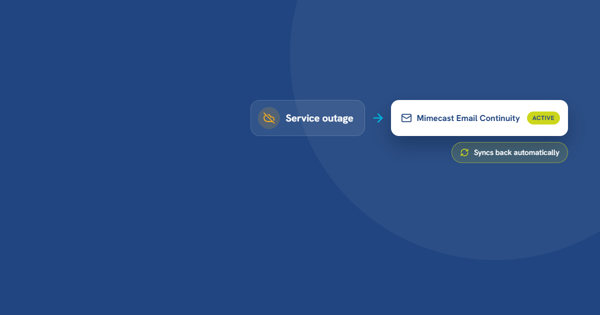
Mimecast Email Continuity is a standby email service on Mimecast's own infrastructure, completely separate from Microsoft 365. When Exchange Online is unreachable, staff switch to it to read recent messages and send and receive new ones. When Microsoft restores service, everything syncs back into users' normal mailboxes automatically, with no manual migration or message recovery.
Your email stays reachable, whatever causes the outage
With Mimecast at the MX (the DNS record that tells the internet where to deliver your email), inbound mail reaches Mimecast first and is filtered before being passed to Microsoft 365.
| Setup | Path of inbound email | If Exchange Online is unavailable |
|---|---|---|
| Mimecast at the MX | Internet → Mimecast → Microsoft 365 → user | Mimecast accepts and holds new mail, while users keep working through Mimecast's portal, apps or Outlook add-in. |
| Microsoft 365 only, Internet | Microsoft 365 only, Internet | Mail waits in a queue, and users cannot reach it until Microsoft restores service. |
Mimecast keeps a five-day rolling copy of recent email and can hold new mail for as long as an outage lasts (Mimecast documentation). Microsoft's own redundancy sits entirely inside Microsoft, so a platform-wide fault can take out the backup along with the main service. That fault cannot reach Mimecast. Staff can keep reading, replying to and acting on email while Exchange Online is still down.
How prepared organisations kept working through the 12 November 2026 outage
A software defect made the gateway servers in front of Exchange Online seize up under load, and Microsoft's automatic failover spread the problem until more than 80% of those servers had stopped responding (Microsoft's preliminary report, reproduced by Office Watch). At 19:02 UTC, Mimecast directed customers to its web portal and apps (Mimecast status page).
Organisations with continuity enabled and tested could read and reply to email from a browser, the mobile app or the Outlook add-in, with security checks still running. While Microsoft worked on a fix, customer-facing teams could keep answering enquiries, and finance teams could keep approving payments.
Four ways to keep your teams emailing in the next outage
1. Make sure staff can sign in even if Microsoft sign-in fails
Mimecast runs separately, but the way staff reach it may still depend on Microsoft. Confirm users can sign in to Mimecast even if Microsoft sign-in is also affected.
2. Know your setup holds up when everyone switches at once
On 13 November, heavy demand caused intermittent errors in Mimecast's end-user apps for some customers until a fix landed that afternoon. Rehearse with a realistic number of users.
3. Get staff switched over in minutes, not hours
An administrator normally starts a continuity event. Where it's set up, the Outlook add-in switches automatically within 90 seconds, but only for users already signed in (Mimecast documentation). Make sure staff know where the portal is before they need it.
4. Keep staff safe from outage phishing
Within hours of the November incident, phishing emails posing as Microsoft service notices claimed that held messages would be deleted unless the recipient released them (Mimecast threat research). Make sure staff know what a genuine outage notice from IT looks like.
Could your teams keep emailing through the next outage? Five checks for this week
☐ Coverage: if Microsoft 365 failed at 2pm today, could staff email through Mimecast by 2.15pm?
☐ Activation: who can start a continuity event, and who covers when they're away?
☐ Sign-in: can staff reach Mimecast if Microsoft sign-in is also down?
☐ Communication: how will you tell staff to switch when email and Teams are what has failed?
☐ Testing: when did you last rehearse with real users, and did it work?
If any answer needed guesswork, there is work to do before the next outage.
Frequently asked questions
Does Mimecast Email Continuity cover Teams and SharePoint?
No. It covers email only. Teams, SharePoint and other Microsoft 365 services are outside its scope.
Do I need Mimecast Email Continuity if I already have Microsoft 365?
If losing email for several hours would affect revenue, customer service or supplier relationships, an independent continuity service is worth pricing. Even the most reliable platforms have outages from time to time, and a service that runs separately from Microsoft 365 means your email keeps working while service is restored.
The takeaway
A continuity licence is a starting point, not a complete plan. You don't measure the value of email continuity on an ordinary day. You measure it on the day Microsoft 365 goes down.
Would your continuity hold up? Talk to us about a continuity readiness review, and we'll test your Mimecast setup before the next outage does.