


If you’ve ever opened your Azure invoice and thought, “Why is this so high again?”, you’re in good company. Chances are, your business moved to Azure expecting lower costs, better flexibility, and easier scaling. That’s exactly what Azure should give you. But even if the bill is static, that doesn’t mean it’s optimal. Oftentimes, nobody can clearly explain why, and it becomes increasingly difficult to defend that spending to the board.
Over the years, I’ve seen businesses of all sizes fall into the same cost traps in their Azure environments that ultimately result in wasted spend. But the good news is these mistakes are fixable.
In this article, I’ll walk you through the five most common cost traps we see inside real Azure environments. These aren’t theoretical issues; they’re patterns that repeatedly show up when we audit customer environments. By the end, you’ll know where to look, what questions to ask, and what changes can reduce your Azure bill without disrupting your people or compromising performance.
-
What This Article Covers:
- The Five Biggest Cost Traps That Make Businesses Overspend on Azure
- How Azure Overspending Shows Up in the Business
- First Practical Steps to Regain Control of Your Azure Costs
- How a Recruitment Firm Cut Its Azure Bill by ~30%
The Five Biggest Cost Traps That Make Businesses Overspend on Azure
Before we get into the specific cost traps, it’s important to understand one thing: Azure itself isn’t inherently expensive; unmanaged Azure is.
Azure is generally billed on a pay-as-you-go model: you pay for the compute, storage, networking, and services you consume. That flexibility is brilliant only if you actively manage what you provision and how it’s used.
With that being said, let’s unpack the five cost traps we see most often.
1. Treating Azure Like Your Old Server Room (Overprovisioning)
In the old on-prem world, buying more hardware than you actually needed wasn’t a big deal.
If you’d already paid for a physical server, it didn’t cost much extra to throw in extra RAM (memory) or CPU (processing power). IT professionals deliberately ‘future-proofed’ servers, for example, with 64GB of RAM for workloads that may only need 16GB. You paid once, used it for years, and everybody was happy.
When those workloads move into Azure, a lot of businesses repeat that thinking: “This server had 64GB RAM in our data centre, so we’ll pick the 64GB Virtual Machine in Azure.” However, the difference in the cloud is that you’re now paying every month for that oversized capacity.
When we look at Azure environments, we regularly find:
- VMs with very low average CPU and memory utilisation
- Machines running happily at 20–30% usage
- No performance issues, just massive headroom nobody needs
Put simply, that’s a massive overspend which stems from previous assumptions carried into a new model. So, if you haven’t looked at your VM utilisation in a while, there’s a good chance you’re paying for “just in case” capacity that brings you no real benefit. After all, a key benefit of Azure is that you can add that capacity as and when you need it.

2. ‘Set and Forget’ Azure with No Ongoing Governance
This is probably the most common pattern our Azure consultants see.
Azure is easy to spin up. A few clicks and you’ve got a VM, a database, and a new service to test. That’s great for agility. But if nobody takes ownership of what happens after that, your environment slowly fills with:
- “Zombie” resources (i.e., things that were once used but no longer are)
- Old test or dev environments still running months later
- Databases that have been migrated, but the old versions are still alive
- Services someone set up “just to try something” and forgot about
Things get more complicated when there are multiple admins and sub-subscriptions. If one team creates resources and another team pays the bill, there’s a natural disconnect. The people spinning things up don’t feel the cost. So, without some kind of regular review and basic governance, Azure spend tends to inflate quietly over time. You end up paying for things nobody remembers asking for.

3. Paying for Azure While Everyone’s Asleep (No Scheduling)
This is another highly common cost trap, but it’s also one of the easiest things to fix.
Take Azure Virtual Desktop (AVD) as an example. A typical scenario is 50 people using virtual desktops during normal office hours, yet the environment runs 24/7. So, even though nobody is using those desktops overnight or at weekends, you’re still paying for the computing as if they are.
In most businesses, roughly one-third of the week is “working hours.” The remaining two-thirds of the week, your users are at home, asleep, or doing something else entirely. If your environment doesn’t scale down when users log off, you’re effectively burning compute budget for no reason.
What we typically do is:
- Scale the environment up during the day to handle peak demand
- Scale it down in the evening as users log off
- Keep maybe a minimal footprint overnight “just in case”
The users don’t notice any difference: they log in when they need to, the resources are there, and everything feels the same. But from a cost perspective, you’re only paying high compute rates when they’re actually needed. You still pay for storage, of course, but compute is often the largest part of the bill.

4. Using Servers Where a Managed Azure Service Would Be Cheaper
This one is more architectural.
With on-prem, the answer to most requests – whether it was a database, line-of-business app or new tool – was simply to get a server. When businesses move to Azure, they often recreate that architecture – a database server, an application server, and a file server – all as VMs in the cloud.
 But Azure isn’t just “someone else’s data centre.” It has a whole catalogue of managed services that remove a lot of the grunt work, like patching, backups, updates, and so on. For example, instead of running your own SQL Server on a VM, you might use Azure SQL as a platform service. You’re effectively buying the database function, not the server underneath.
Benefits often include:
- Lower cost compared to a beefy VM
- Less admin overhead for your team
- Built-in resilience and backup options
- Smoother scaling as demands change
So, if you’ve simply lifted your on-prem server layout into Azure without rethinking it, chances are you’re paying more than you need to (and making more work for your IT team at the same time).
5. Committing Too Early to Reserved Instances
 Reserved Instances (RIs) are one of Azure’s key cost-saving tools. In simple terms, you say to Microsoft: “We’re going to use this type of resource for one or three years.” And in return, they give you a discount (which is usually quite significant).
That sounds like an easy win, and it absolutely can be. But the problem is when organisations:
- Migrate to Azure
- Make one of the above mistakes
- Lock those oversized resources in with RIs
Now they’re committed to paying for too many resources for one or three years.
I’ve seen companies do this with good intentions by trying to be cost-conscious. But if you commit before you properly understand your actual usage, RIs become a cost trap instead of a cost saver.

Reserved Instances aren’t automatically good or bad: they’re powerful when used at the right stage. When used too early, they lock in the waste.
How Azure Overspending Shows Up in the Business
Let’s step away from the technical side for a second.
When a business is overspending on Azure, this usually results in:
- Unpredictable bills: The monthly invoice jumps up and down. You can’t confidently forecast, and finance starts asking harder questions.
- Budget strain and opportunity cost: Money tied up in unnecessary Azure resources can’t be used elsewhere, such as headcount, security, productivity tools, or innovation projects.
- Loss of confidence in the cloud: Leaders start to say things like, “Is this cloud thing really worth it?” That slows down transformation and holds the business back.
- Pressure on small IT teams: IT leaders and admins end up being held responsible for costs they never really had the time or tools to manage properly.
The important point is this: most Azure overspend is avoidable. You don’t need to rip everything out. You just need to understand where the waste is and take systematic action.
First Practical Steps to Regain Control of Your Azure Costs
 Step 1 – Get Proper Visibility
Start with data, not guesses.
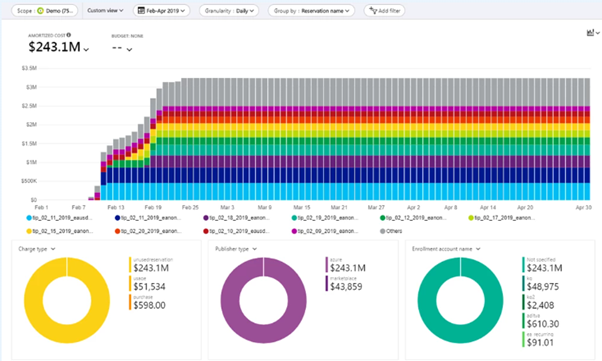
- Pull Azure cost reports for the last 30–90 days
- Break down spending by subscription, resource group, and resource
- Look at usage metrics alongside the cost (CPU, RAM, storage, etc.)
This part can feel overwhelming if you’re not living in Azure every day, but it’s essential. You can’t optimise what you can’t see.
Step 2 – Ask Three Simple Questions About Every Resource
For each significant resource, work through three questions:
1. Do we still need this at all?
If the answer is no, turn it off or delete it. That’s immediate, clean savings. REMEMBER: just turning off a machine doesn’t stop all the costs.
2. If we do need it, is it the right size?
Check utilisation. If it’s consistently low, consider scaling down and restarting with smaller specs.
3. Is there a better way to deliver this function?
For example, should that database live on a managed service rather than a full VM?
Could shared services replace multiple standalone machines?
Those three questions alone uncover a lot of obvious waste.
Step 3 – Introduce Lightweight Governance and Scheduling
You don’t need a huge FinOps team to make this work. For many mid-sized organisations, something like this is enough:
- A monthly cost review between IT and finance
- A basic tagging standard (owner, department, environment: prod/test/dev)
- Rules about expiry or review dates for dev/test and experimental resources
- Scheduling for anything that doesn’t need to run 24/7
Think of it as a regular health check for your Azure estate.
Step 4 – Get Expert Eyes on Your Environment
Finally, don’t underestimate the value of someone who looks at Azure environments all day, every day. We know where to look first and which patterns almost always hide savings.
Often, we can find 20–30% cost reductions just by:
- Right-sizing oversized VMs
- Turning off unused or zombie resources
- Modernising a handful of services
- Implementing basic scheduling
For stretched internal IT teams, that outside perspective can be the difference between feeling “stuck with the bill” and feeling back in control.
How a Recruitment Firm Cut Its Azure Bill by ~30%
Let me bring this to life with a real example.
One of our customers, a recruitment firm with around 150 users, came to us because their Azure bill felt too high, and they couldn’t explain exactly why.
Here’s what we found:
- They’d lifted several on-prem servers directly into Azure, keeping their original (over)specs
- They were running Azure Virtual Desktop for their users 24 hours a day, 7 days a week
- A few legacy workloads were still humming away in the background, long after their original purpose had disappeared
We went through the process I’ve just described:
- Analysed utilisation
- Right-sized the database and application servers
- Implemented scheduling for AVD so it scaled for working hours instead of running flat-out all week
- Switched off resources that genuinely weren’t needed anymore
The outcome?
- Around 30% reduction in their Azure bill
- No noticeable impact for their users
- A lot more confidence in Azure internally because people now understood where the money was going, and what they were getting for it
Those are the kind of results you get when you treat Azure as something to be managed, not just something you “have.”
Ready to Stop Guessing About Your Azure Costs?
Overspending in Azure is incredibly common, especially for SMBs with small IT teams who are already firefighting day-to-day issues.
But the important thing to remember is that it’s fixable. You don’t need to rebuild everything. You just need to identify and address the cost traps that translate into unpredictable bills, budget pressure, and scepticism about whether the cloud is worth it.
My team and I help businesses like yours make sense of their Azure environments, cut the waste, and get their costs back under control without breaking what’s already working.
If you suspect you’re overpaying — or you simply want clarity — get in touch with us and one of our Azure consultants would be more than happy to take a closer look at your estate.


.png?width=40&height=40&name=CA%2021%2c%202026%2c%2009_42_21%20PM%20(1).png)